
Getting Started
AgentsInFlow is a desktop application for orchestrating AI coding agents: Claude Code, Codex, Cursor, and OpenCode, across your git projects. You bring your own AI subscription and AgentsInFlow gives those agents structure, memory, visibility, and coordination. Think of it as a project-management layer that turns scattered terminal sessions into trackable, resumable, context-aware work.
This guide walks you from a fresh install through your first AI-driven ticket in roughly five minutes. Every step below reflects what the app does today, not what it did six months ago.
What AgentsInFlow Does
Most developers using AI coding assistants run them in loose terminal sessions. Context is lost between runs, there is no history of what was tried, and coordinating multiple agents across branches is manual. AgentsInFlow sits on top of your existing AI CLI subscriptions and gives you a coherent workspace around them.
- Project organisation. Group repositories, configure per-project engines and models, and switch between codebases without losing context. See Work Management.
- Ticket-based work management. Create typed tickets (bug, feature, task, document, agent), organise them on a kanban board, and track dependencies.
- Agent execution with full visibility. Run AI agents against tickets, watch live terminal output, review changes in a built-in git view, and resume suspended attempts. See Execution & Config.
- A rich markdown editor. Slash commands, wikilinks, embedded diagrams, inline drawing, and drag-and-drop media. See Editor & Diagrams.
- 28 diagram engines. Render architecture, sequence, network, hardware, and data visualisations inline using Mermaid, PlantUML, D2, Excalidraw, and more.
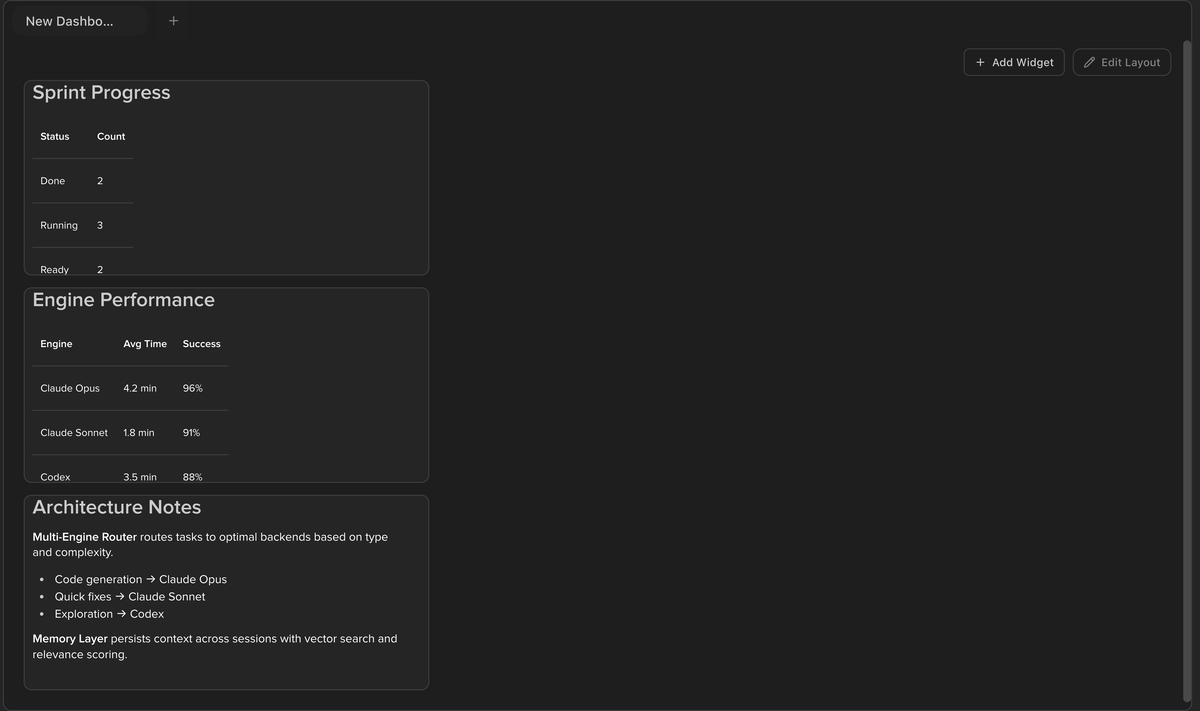
- Customisable dashboards. Build status boards with chart widgets (ECharts), diagram widgets, and markdown panels on a 12-column grid.
- Persistent chat and assistant. Conversation history survives restarts, chats are organised in folders, and images attach inline. See Assistant Workflows.
- Persistent terminals. Keep terminal sessions alive across app restarts, send input to running processes, and view output alongside ticket details. See Terminal.
- Memory that compounds. Project-scoped and assistant-scoped memory stores decisions, procedures, principles, and incidents so agents improve over time.
- Browser automation. Connect the browser extension for page navigation, DOM interaction, screenshots, and form filling. See MCP & Browser.
- Keyboard-first navigation. A command center, global search, view-mode switching, and customisable shortcuts. See Keyboard Shortcuts.
You do not need to change your AI workflow. AgentsInFlow wraps whatever CLI you already use and adds the structure around it. The screenshot below shows the assistant chat view with conversation history.
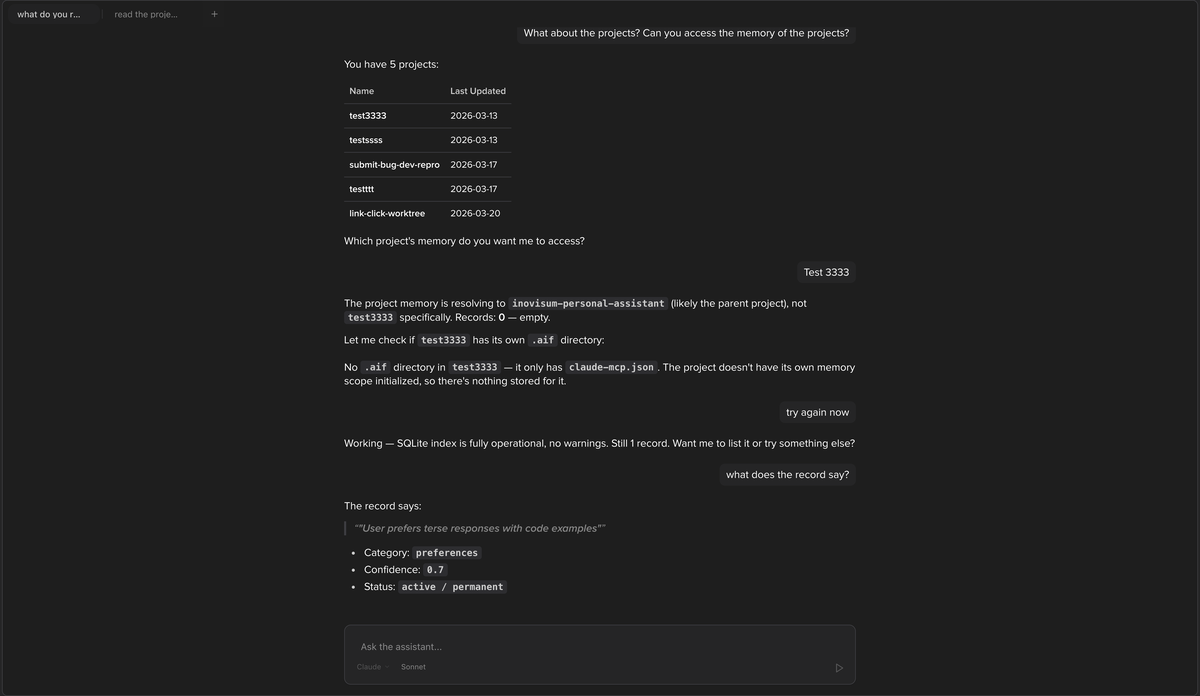
- The Assistant view provides a full-screen chat interface for interacting with AI agents.
- Conversations are persisted across sessions and can be organised into folders in the sidebar.
- The engine and model selector at the bottom lets you switch between Claude, Codex, Cursor, and OpenCode mid-conversation.
Installation
System Requirements
| Requirement | Details |
|---|---|
| Operating system | macOS 12+, Windows 10+, Linux (Ubuntu 20.04+, Fedora 36+) |
| RAM | 4 GB minimum, 8 GB recommended |
| Disk space | ~300 MB for the application |
| AI CLI | At least one of: Claude Code, Codex, Cursor, or OpenCode (installed and authenticated) |
| Git | Git 2.30+ installed and available on PATH |
Download and Install
- Download the latest release for your platform from GitHub Releases.
- macOS. Open the
.dmgand drag AgentsInFlow to/Applications. On first run, right-click the app and select Open to bypass Gatekeeper. - Windows. Run the
.exeinstaller. If SmartScreen appears, click More info then Run anyway. - Linux. Install the
.AppImageor.debpackage. For AppImage, runchmod +xfirst.
Authenticate Your AI CLI
AgentsInFlow does not manage AI credentials directly. It delegates to whichever CLI you have installed. Before running your first ticket, make sure at least one CLI is authenticated.
Claude Code (Anthropic)
npm install -g @anthropic-ai/claude-code
claude login
Codex (OpenAI)
npm install -g @openai/codex
codex login
Cursor
cursor-agent --loginIf the app does not detect your CLI, make sure it is installed globally (
npm list -g) and that your shellPATHincludes the install location. Codex and Claude Code both live under the global npm prefix, Cursor ships its own binary.
The Workspace Layout
AgentsInFlow’s interface is organised into three regions that work together to give you visibility into every layer of your project.
Sidebar
The sidebar occupies the left edge of the window at a default width of roughly 280 pixels. It contains:
- App header. The AgentsInFlow logo and a Settings affordance that appears on hover.
- Projects list. Each project shows a colour dot and its name. Click to open. Right-click for a context menu with options to open the folder in Cursor, VS Code, or your system file manager. Expanding a project reveals its kanban, explorer, and notes trees.
- Action buttons. New Ticket (
Cmd+Shift+G/Ctrl+Shift+G) opens the ticket composer. New Terminal has two defaults:Cmd+T/Ctrl+Tlaunches a terminal immediately andCmd+Shift+T/Ctrl+Shift+Topens the destination-picker dialog. - Assistant chat. An inline chat panel at the bottom of the sidebar for quick AI conversations without leaving the current view.
When the sidebar is collapsed it becomes a vertical rail showing project icons with colour-coded badges. Each badge is a single click away from switching projects.

Content Area
The content area fills the centre of the window and displays whatever view mode is active: workspace tabs, kanban board, dashboard, git history, activity log, embedded browser tabs, or the full assistant chat.
Inspector Panel
When you open a ticket in Workspace mode the content area splits into two resizable panels.
| Panel | Min Width | Contains |
|---|---|---|
| Left (Ticket Details) | 320 px | Title, description, notes, dependencies, child tickets |
| Right (Execution) | 640 px | Attempt tabs, execution config bar, live terminal output, git drawer |
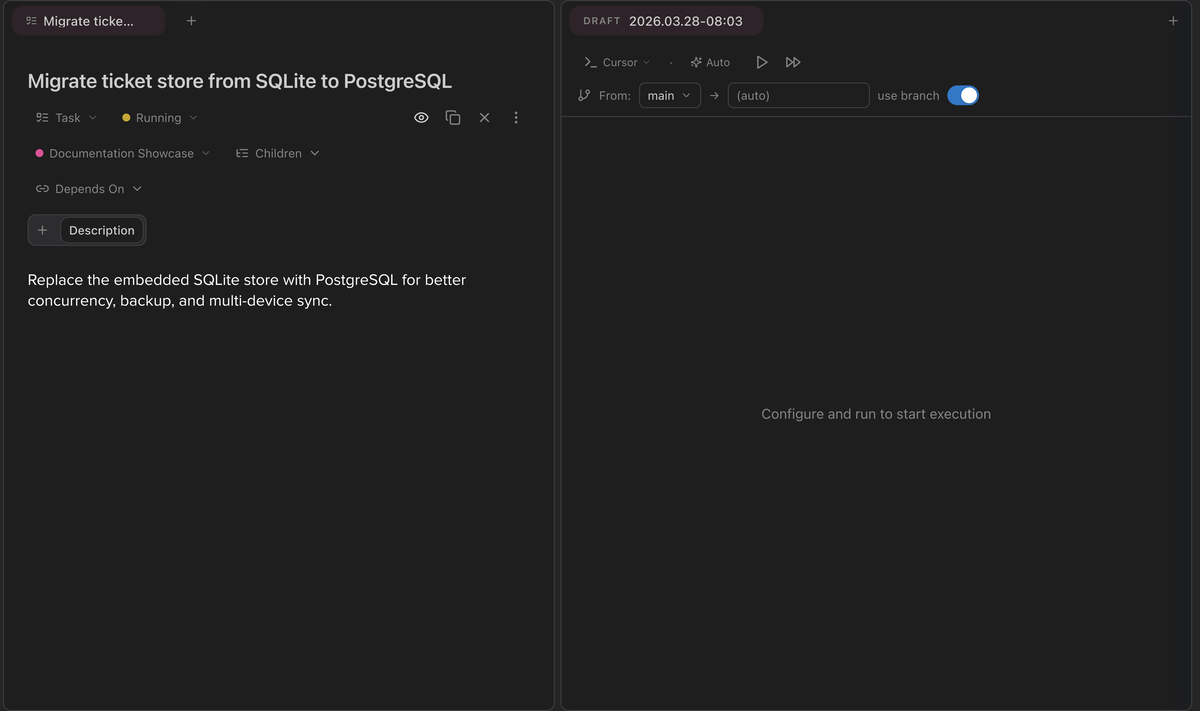
- The ticket title and type badge appear at the top of the left panel.
- The markdown description fills the body of the panel.
- Tabs for Children and Depends On let you manage ticket relationships.
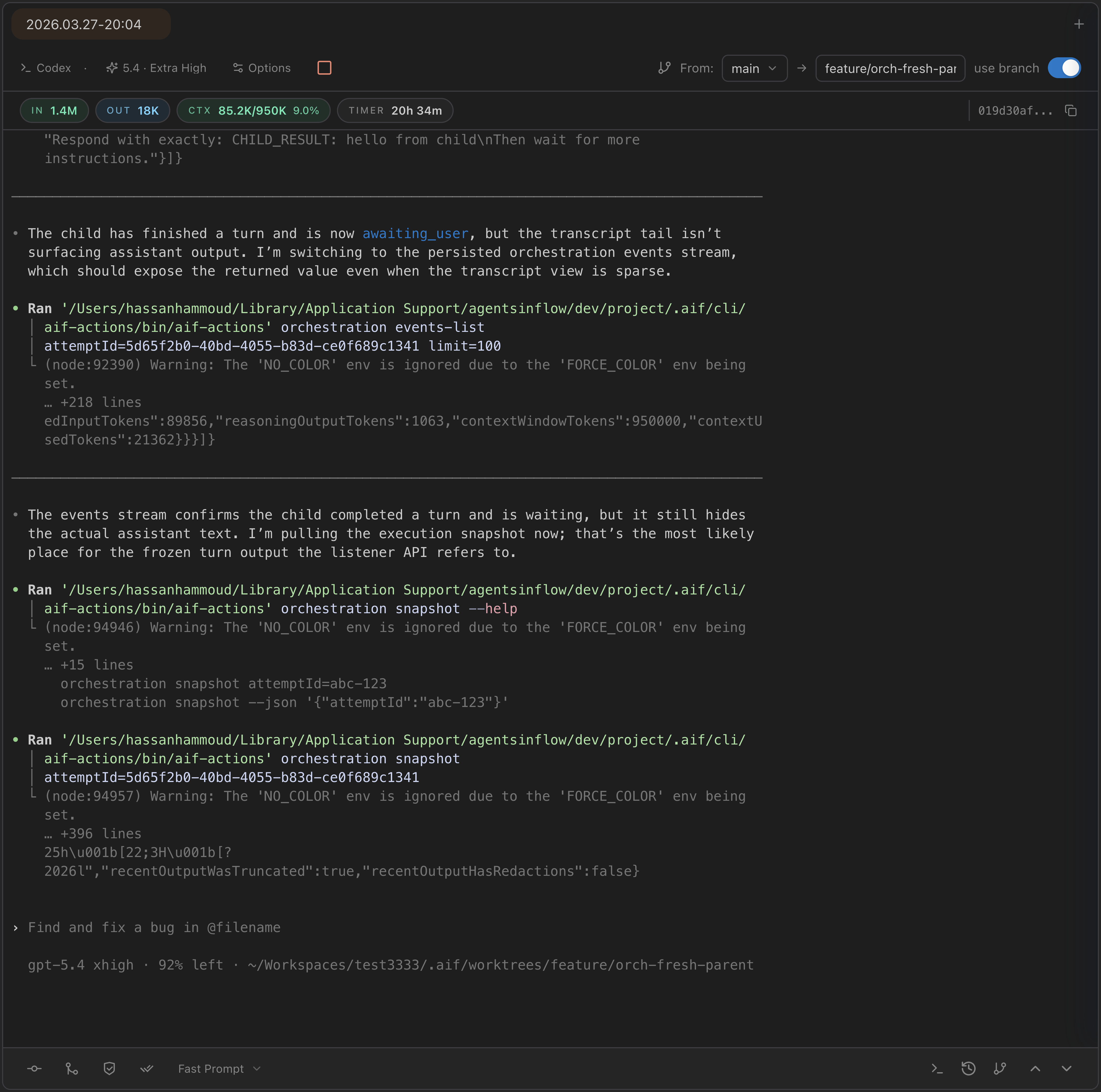
- The config bar at the top of the right panel shows the engine, model, branching options, and live token metrics.
- The terminal below streams agent actions in real time.
- Buttons for Stop, Commit, Merge, and Mark as Done appear in the bar.
Drag the divider between panels to resize. The split persists across sessions.
Collapse the sidebar to maximise your content area. Sidebar, content, and inspector-panel widths are all adjustable from their respective gutters.
Navigation Modes
AgentsInFlow has seven view modes, each accessible via keyboard shortcut (where one is bound) or the View Mode Switcher buttons at the top of the sidebar.
| Mode | macOS | Windows / Linux | What It Shows |
|---|---|---|---|
| Assistant | Cmd+1 | Ctrl+1 | Full-screen AI chat with conversation history and folders |
| Dashboard | Cmd+2 | Ctrl+2 | Widget grid with charts, diagrams, and markdown panels |
| Kanban | Cmd+3 | Ctrl+3 | Ticket board organised by status columns |
| Workspace | Cmd+4 | Ctrl+4 | Tab-based editing with tickets, files, and terminals |
| Git | Cmd+5 | Ctrl+5 | Branch visualisation, commit history, and diff viewer |
| Activity | Cmd+6 | Ctrl+6 | Unified event log of all agent and system actions |
| Browser | — | — | Embedded Chromium tabs with shared session state (no default shortcut) |

The active mode is highlighted with the project’s accent colour. Click any button or use its keyboard shortcut to switch.
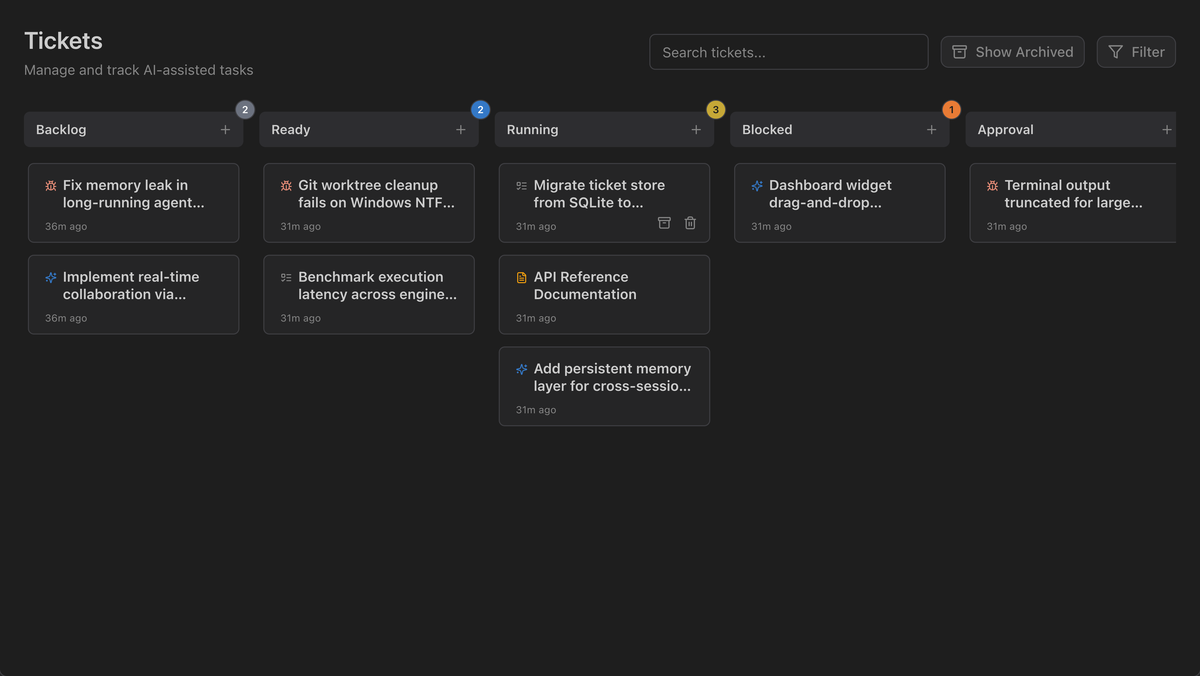
The Kanban view organises tickets into Backlog, Ready, Running, Blocked, Approval, and Done columns. Each card shows its type badge, title, and creation date. The Active Agents panel on the right shows currently running executions across projects.
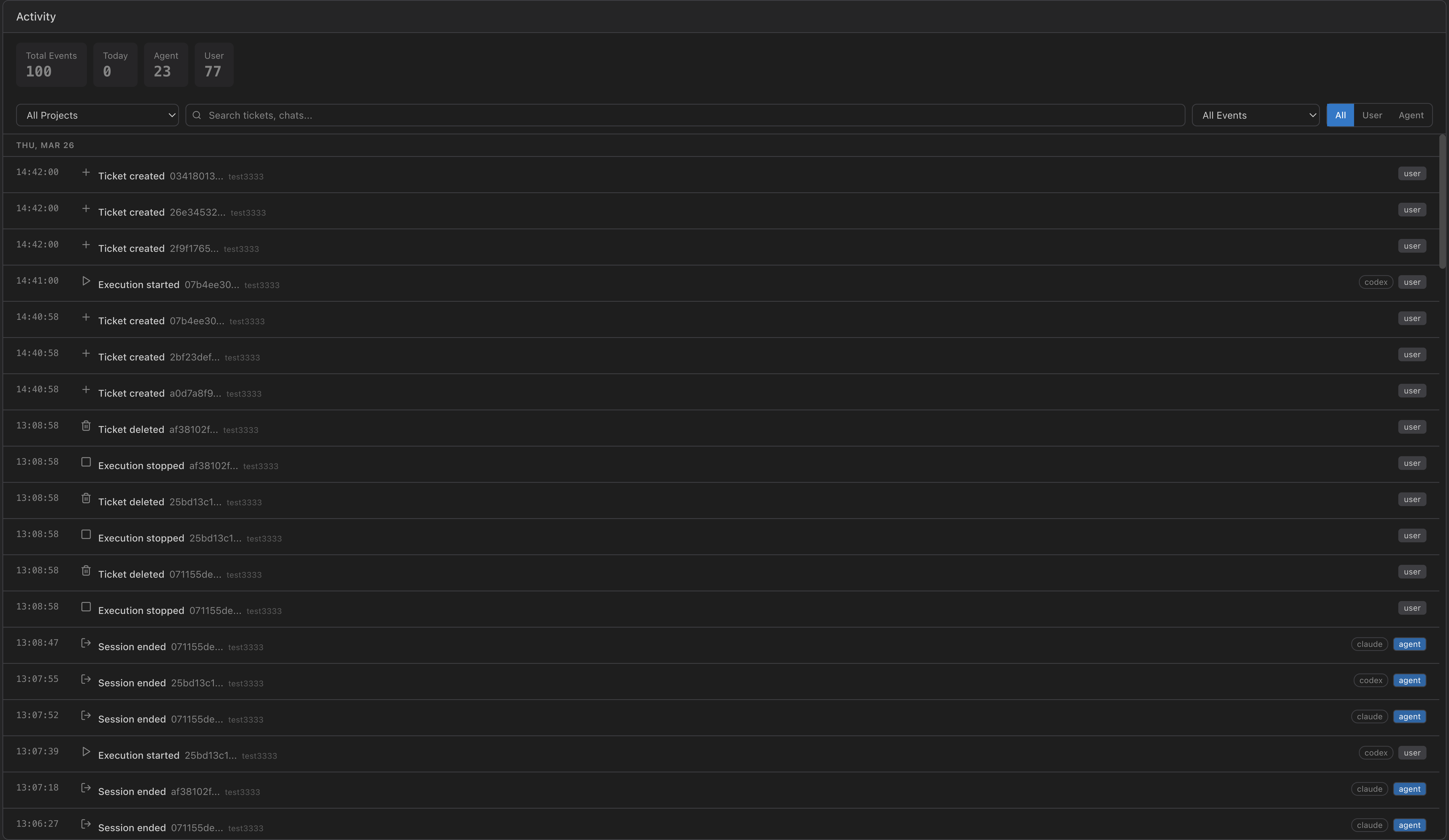
The Activity view provides a unified event log of all agent and system actions across your project. Events are listed chronologically with timestamps, source type (user, agent, system), and descriptions. Filter by source to isolate agent actions from user actions.
The Assistant can also be opened as a floating window that stays on top of other views. See Assistant Workflows for inline vs. detached mode.
Three Layers of Work
AgentsInFlow organises work into three layers. Understanding this mental model helps you use the right tool at the right time.
| Layer | Storage | Best For | Formality |
|---|---|---|---|
| Chat | Conversation history, folders | Exploration, brainstorming, quick questions | Low |
| Tickets | Database, typed, dependency-linked | Trackable work, agent-executable tasks | Medium |
| Files | On-disk markdown and code | Knowledge base, documentation, long-form content | High |
The typical progression is conversation then ticket then execution then files. Not every conversation needs to become a ticket, and not every ticket needs agent execution. Use the layer that matches the formality of your work.
The Dashboard view sits alongside these three layers as a monitoring surface. Dashboards use a 12-column grid where you place chart widgets, diagram widgets, and markdown panels. The Active Agents panel on the right shows currently running executions with status and duration.
Start in chat. When work becomes actionable, create a ticket. The agent writes the files.
Your First Workflow
Follow these steps to go from a fresh install to a completed AI-driven task.
- Register a project.
Click the
+button next to the Projects list in the sidebar (or on the collapsed icon rail), or open the Command Center withShift+Shiftand search for “new project.” Select a local git repository to associate with the project. In the dialog you can name the project, choose an accent colour, and set the default AI engine and model. - Create a ticket.
Click New Ticket in the sidebar or press
Cmd+Shift+G/Ctrl+Shift+G. The composer opens with fields for Title, Type (bug, feature, task, document, agent), Priority, and a markdown Description. Write a clear description. The AI agent reads it as its primary instruction. - Configure the engine.
The execution config bar appears at the top of the right panel when you open a ticket. Select your Engine (Claude, Codex, Cursor, or OpenCode), Model, and adjust CLI Options: permission mode, approval policy, sandbox settings, and MCP server selection. For Claude, you can also set the Reasoning Effort level. The config bar inherits defaults from your project settings and any value can be overridden per execution.
- Run the ticket.
Click the Play button (triangle icon) to start the agent. Play opens the terminal and waits for an optional prompt. Fast Forward submits the ticket description and starts immediately.
- Watch it work.
The right panel shows live terminal output as the agent works. The execution config bar updates in real time with input tokens, output tokens, context usage, and a live duration timer. Context usage is colour-coded: green under 50 percent, amber between 50 and 80 percent, rose above 80 percent. Stop the execution at any time, or let it run to completion.

- Review the result.
When the agent finishes, switch to the Git view (
Cmd+5/Ctrl+5) to see all changes. Browse diffs, review commits, and accept or reject changes before pushing. Each execution creates an attempt, a discrete run with its own terminal output, git changes, and status. You can run multiple attempts per ticket with different engines or models and compare results.
Make sure your AI CLI is installed and authenticated before running your first ticket. AgentsInFlow shows an error if the selected engine’s CLI is not found on your shell
PATH.
Remote & Web-Only Access
Packaged builds can expose a tokenised browser UI so you can use AgentsInFlow from another browser, another device on your LAN, or behind a tunnel such as Cloudflare Tunnel.
- Open App → Settings → Remote Access.
- Enable Remote Access, optionally choose a fixed port, and rotate the token if needed.
- Use Save and Restart so the new port and token take effect.
- Open the tokenised URL shown by the app. To connect from another device, replace
127.0.0.1with your machine’s LAN IP and keep the same port and token.
For a one-off browser-only launch, run the packaged app with --remote. This forces remote access on for that launch, runs the app headlessly, and does not rewrite the saved Remote Access setting.
/Applications/AgentsInFlow.app/Contents/MacOS/AgentsInFlow --remoteSecurity model. When Remote Access is enabled, AgentsInFlow opens a reachable port on the machine. The tokenised URL is one protection layer, but network reachability is still controlled by your firewall, LAN, tunnel, or router path. Use the saved setting for normal behaviour. Use
--remoteonly when you intentionally want a one-off web-only launch.
Key Shortcuts Reference
These shortcuts work globally across all view modes.
| Action | macOS | Windows / Linux |
|---|---|---|
| Switch to Assistant | Cmd+1 | Ctrl+1 |
| Switch to Dashboard | Cmd+2 | Ctrl+2 |
| Switch to Kanban | Cmd+3 | Ctrl+3 |
| Switch to Workspace | Cmd+4 | Ctrl+4 |
| Switch to Git | Cmd+5 | Ctrl+5 |
| Switch to Activity | Cmd+6 | Ctrl+6 |
| Open Command Center | Shift+Shift | Shift+Shift |
| New Ticket dialog | Cmd+Shift+G | Ctrl+Shift+G |
| New Ticket (direct) | Unbound by default | Unbound by default |
| New Terminal (direct) | Cmd+T | Ctrl+T |
| New Terminal dialog | Cmd+Shift+T | Ctrl+Shift+T |
| Save active editor | Cmd+S | Ctrl+S |
| Find in file | Cmd+F | Ctrl+F |
| Replace in file | Cmd+R | Ctrl+R |
| Toggle voice transcription | Cmd+Alt+R | Ctrl+Alt+R |
For the complete reference and customisation options see Keyboard Shortcuts.
Next Steps
Now that the fundamentals are in place, explore the features that matter most to your workflow.
- Work Management: projects, tickets, kanban board, dependencies.
- Execution & Config: running agents, multiple attempts, execution history.
- Assistant Workflows: chat, conversation management, inline and detached modes.
- Editor & Diagrams: markdown editing, 28 diagram engines, slash commands.
- Git Version Control: branch visualisation, diffs, worktrees.
- Terminal: persistent terminals, multi-session management.
- Engine & Model Config: per-project engine settings, MCP servers.
- Keyboard Shortcuts: customisable keybindings, chord sequences.